
Adding servers
View as MarkdownInfraWard has no agent. It reaches each server over SSH with a dedicated, read-only account that the enrolment script creates. You enrol the top-level machines only: a Proxmox node, a Docker or Podman host, a Plesk server or a plain Linux server. What they contain (CTs, VMs, containers, images, sites) is discovered automatically.
Enrolling a server requires the assets.write permission (roles Admin and Editor).
Before you start
Section titled “Before you start”Check that the server meets the managed server requirements: OpenSSH with sshd_config.d, sudo (or let the script install it), python3 and a synchronised clock. The InfraWard worker must reach the server on its SSH port.
1. Generate the command
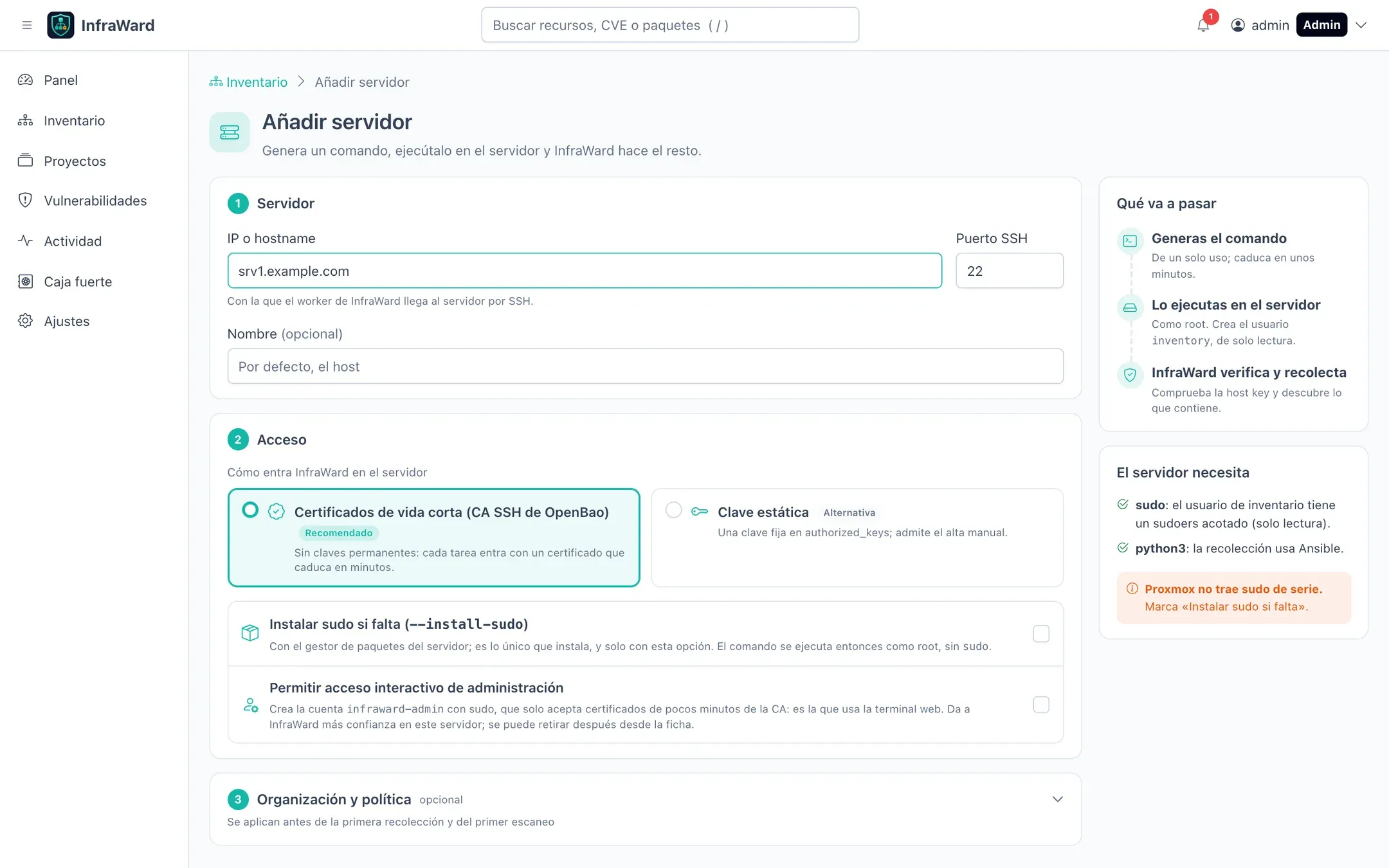
Section titled “1. Generate the command”Go to Inventario → Añadir servidor (Inventory → Add server).
-
Servidor (Server): the IP address or hostname the worker will use to reach the server, the SSH port (22 by default) and an optional display name.
-
Acceso (Access): how InfraWard signs in.
Mode How it works When to use it Certificados de vida corta (CA SSH de OpenBao) (Short-lived certificates) No key is installed. sshd trusts InfraWard’s CA for the inventoryuser only. Every job gets a certificate valid for 5 minutes.Default and recommended. Requires OpenBao. Clave estática (Static key) InfraWard generates an ed25519 key pair, keeps the private key in the secrets provider and installs the public key in authorized_keyswithrestrict.Without OpenBao, or when you cannot change the sshd configuration. Also allows manual enrolment. -
Options:
- Instalar sudo si falta (
--install-sudo) (Install sudo if missing): the script installssudowith the system package manager. Needed on Proxmox VE. With this option the command runs as root, withoutsudo. - Permitir acceso interactivo de administración (Allow interactive administration access): only for administrators and in certificate mode. Creates the
infraward-adminaccount, used by the web terminal. You can remove it later from the server’s page.
- Instalar sudo si falta (
-
Organización y política (Organisation and policy), optional: tags, projects, a policy template and exclusions from scanning. They apply before the first collection and the first scan, which is useful to keep a server out of scanning from the start.
-
Select Generar comando de alta (Generate enrolment command).
2. Run the command on the server
Section titled “2. Run the command on the server”The page shows the command, when it expires and two tabs.
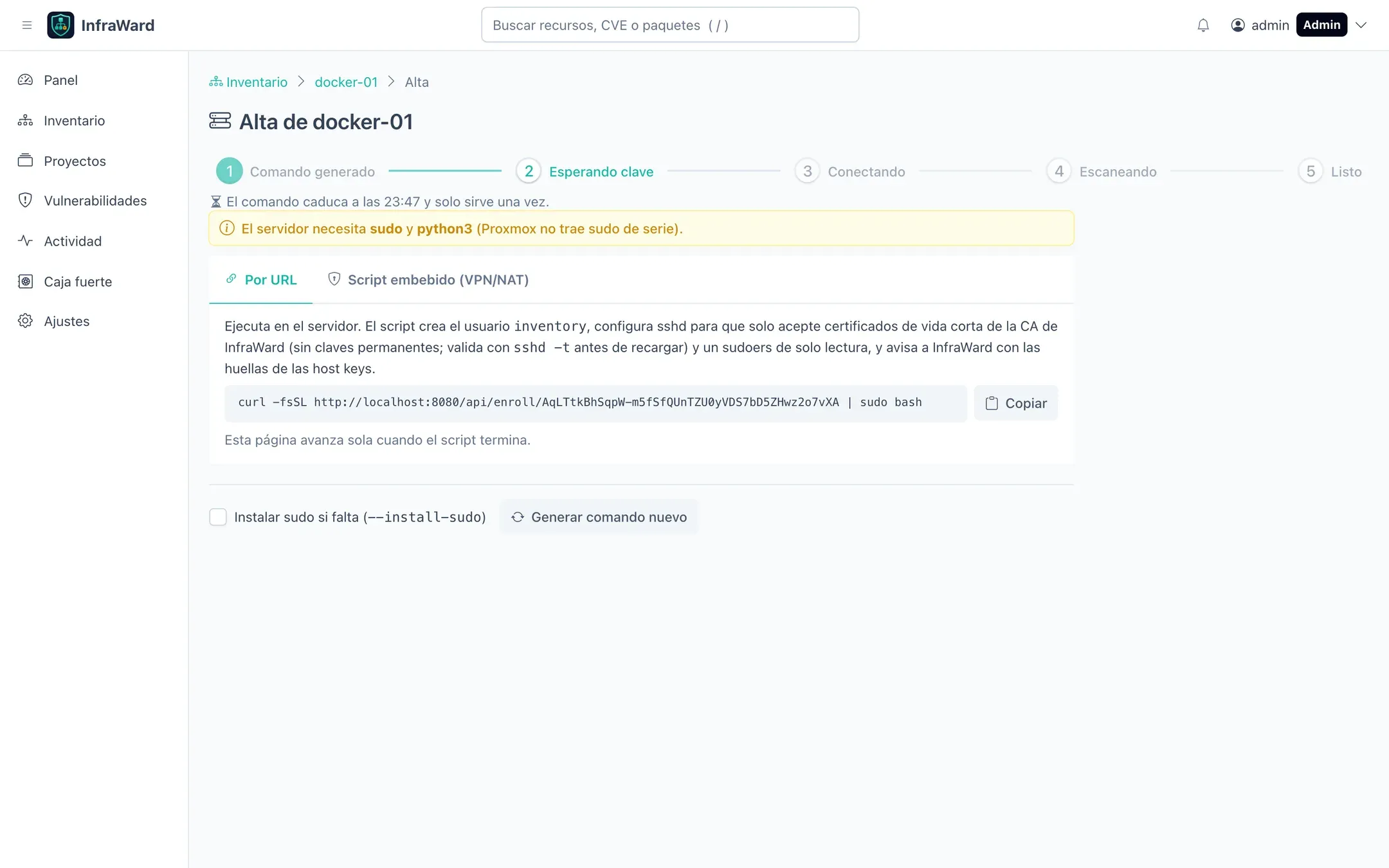
The server downloads the script from InfraWard and reports back when it finishes:
curl --proto =https --proto-redir =https -fsSL --max-time 120 https://infraward.example.com/api/enroll/<token> | sudo bashOn a server without sudo (for example Proxmox VE), run as root and add the option:
curl --proto =https --proto-redir =https -fsSL --max-time 120 https://infraward.example.com/api/enroll/<token> | bash -s -- --install-sudoThe token is single-use and expires after 20 minutes by default (ENROLLMENT_TOKEN_TTL, 15 to 30 minutes). Only its hash is stored. If it expires, select Generar comando nuevo (Generate new command).
With an https URL, --proto =https --proto-redir =https stops curl from following a redirect to plain HTTP, where anyone in the path could replace a script that runs as root. --max-time 120 stops it from hanging. When the script reports back to InfraWard, it also uses only HTTPS if the API URL is https.
For servers that cannot reach InfraWard. The whole script is in the command, compressed and base64-encoded, and contains no token:
echo '<base64 script>' | base64 -d | gunzip | sudo bashThe script prints the SHA256 fingerprints of the server’s host keys. Paste them into InfraWard to finish the enrolment. The worker still needs to reach the server over SSH.
Manual enrolment (static key mode only): instead of running the script, add the public key that InfraWard shows to the authorized_keys of an existing account (never root) and select Ya lo he añadido (I have added it). Without the script there is no restricted helper, so collection is limited to what that account can read.
3. Follow the progress
Section titled “3. Follow the progress”The page advances on its own: Comando generado → Esperando clave → Conectando → Escaneando → Listo (Command generated → Waiting for key → Connecting → Scanning → Done).
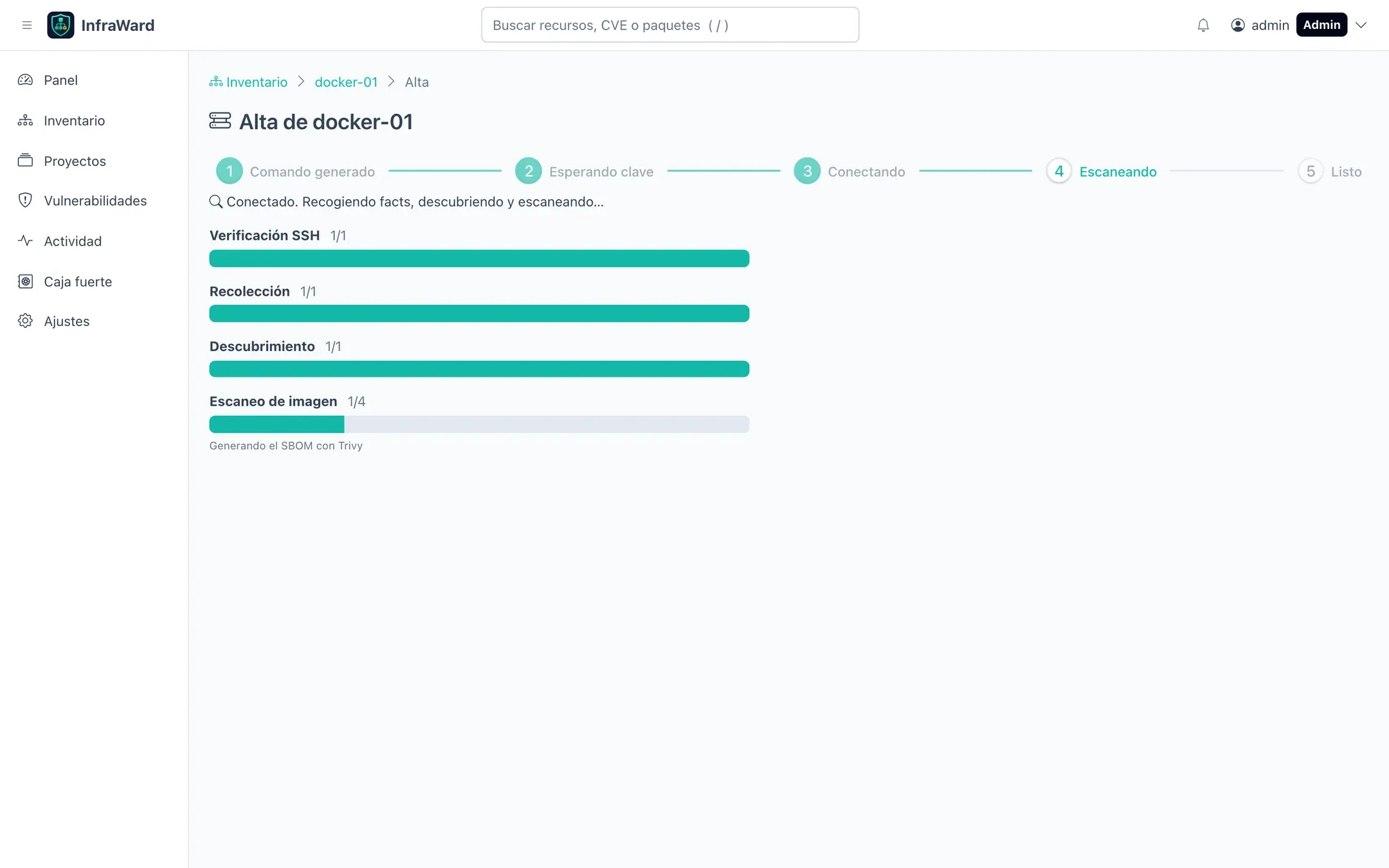
- The worker connects with
StrictHostKeyChecking=yesagainst the fingerprints the script reported. If they do not match, the connection is refused and nothing is collected. - Collection with Ansible: system, packages, services, listening ports and network.
- Discovery: Proxmox CTs and VMs, Docker and Podman containers, images, networks and volumes, Plesk subscriptions.
- Scans: an SBOM of the server and of each container image, evaluated with Trivy.
A Docker host with four containers took about two minutes in our tests, most of it spent scanning images. Large images take longer.
If a step fails, the server’s Recolecciones tab shows the log of that run with the error. See Run logs.
What the script changes on the server
Section titled “What the script changes on the server”The script is idempotent: running it again updates the configuration without duplicating anything. It only touches the files below.
| Path | Mode | Purpose |
|---|---|---|
User inventory |
both | Dedicated account with a shell but no password. |
/usr/local/libexec/infraward/infraward-query |
both | Root helper with a closed list of read-only queries. It validates every argument and runs commands without a shell. |
/etc/sudoers.d/infraward-inventory |
both | One rule: inventory may run the helper through sudo -n. Never ALL. Validated with visudo. |
/etc/infraward/sudoers-version |
both | Version of the rule, so InfraWard can tell you when it needs updating. |
~inventory/.ssh/authorized_keys |
static key | One line per asset, marked with inventory@infraward:<asset-id>, with restrict. Written as inventory, never as root. The script stops if ~/.ssh or authorized_keys is a symbolic link or belongs to another user. |
/etc/ssh/sshd_config.d/00-infraward.conf |
certificate | Match User inventory block: trusted CA, principals file, no TTY, no forwarding. Validated with sshd -t and rolled back if it fails. |
/etc/ssh/infraward/trusted_user_ca_keys and /etc/ssh/infraward/principals/inventory |
certificate | Public key of InfraWard’s CA and the only accepted principal. |
User infraward-admin, /etc/ssh/sshd_config.d/01-infraward-admin.conf, /etc/sudoers.d/infraward-admin |
administration access | Account for the web terminal. It only accepts CA certificates with the infraward-operators principal; no keys and no password. |
/etc/infraward/podman-users |
both, optional | Rootless Podman users InfraWard may query. Only written with --podman-users; usually it is written later by Habilitar (see Podman). |
The main sshd_config is never modified. If sshd_config restricts users with AllowUsers or AllowGroups and leaves inventory out, the script prints a warning and changes nothing.
Check the result on the server
Section titled “Check the result on the server”sudo -l -U inventorysudo sshd -T -C user=inventory,host=localhost,addr=127.0.0.1 | grep -Ei 'trustedusercakeys|authorizedprincipalsfile'Platform notes
Section titled “Platform notes”- Proxmox VE: enrol the node with
--install-sudo. CTs are discovered and collected from the node throughpct exec; installpython3in each CT you want collected. VMs are discovered from the node; to collect their contents, enrol each VM as a server. - Docker: containers, images, networks and volumes are discovered. Images are exported with
docker saveand scanned on the worker, so they never run. - Podman: see below.
- Plesk: subscriptions, domains, databases and certificates are discovered. The Plesk queries never read passwords or private keys.
Podman
Section titled “Podman”Hosts with Podman get the podman-host role. InfraWard uses the native podman command, so neither podman-docker nor a root socket is needed, and a host can run Docker and Podman side by side.
- Rootful Podman: containers, images, volumes and networks are inventoried like Docker’s. Pods and quadlet or systemd containers are shown on each container (the pod’s infra container is skipped). Images are exported with
podman saveand scanned on the worker, and the web terminal opens in these containers. - Rootless Podman: each collection detects, read-only, the users who run Podman (running containers, an active user socket or container storage in their home). They are listed in the Usuarios de Podman (Podman users) card of the server with one of three states: Inventariado (Inventoried), Sin socket (No socket) or Sin habilitar (Not enabled). Detected users who are not enabled, and enabled users without an active socket, also raise a warning on the server.
Detecting a user enables nothing. To inventory a user’s containers, select Habilitar (Enable) in that card. InfraWard offers two ways to run the same script, which turns on linger and the user’s podman.socket and adds the user to /etc/infraward/podman-users, the server-side consent:
| Option | When |
|---|---|
Copy the command and run it with any account that has sudo |
Always available. |
| Ejecutar con infraward-admin (Run with infraward-admin) | The server has administration access and you can open a terminal on it. It opens a read-only terminal that shows the command and its output. |
Then collect the server again. The users’ containers appear with their owner (alice/web). InfraWard queries each user’s own socket, running the Podman client as that user, never as root.
To set the list by hand when enrolling, add --podman-users to the command, for example curl … | sudo bash -s -- --podman-users=alice,bob. --podman-users= empties the list; without the option the list is left as it is.
Podman requires sudoers version 8 (InfraWard 0.6.0). On a Podman host enrolled with an older version the server shows sudoers desactualizado (sudoers out of date) and nothing of Podman is inventoried: regenerate the command and run it again.
Maintenance actions
Section titled “Maintenance actions”On the server’s page, InfraWard warns when the sudoers rule or the CA keys installed on the server are out of date. Use Regenerar el comando (Regenerate command) and run the new command: it updates the server in place.
A server enrolled with a static key can move to certificates with Pasar a certificados (CA) (Move to certificates). Run the command it generates; the script removes the static key only after sshd accepts certificates, and InfraWard deletes the private key from the secrets provider once the worker connects with a certificate.
Remove a server
Section titled “Remove a server”| Action | Effect |
|---|---|
| Retirar (Remove), under administration access | Removes infraward-admin and its sshd and sudoers files. The server stays in the inventory. |
| Dar de baja (Retire) | Reversible. The asset is marked as retired, pending enrolments are cancelled and the static key is deleted from the secrets provider. InfraWard shows a cleanup command. |
| Purgar (Purge) | Permanent. Deletes the asset, its history and its findings. Admin only, with re-authentication. |
Run the cleanup command that InfraWard shows on the server. It removes the asset’s line from authorized_keys, the CA trust and the administration account (in certificate mode), then the sudoers rule, the helper and the inventory user if no other InfraWard asset uses them. sshd is reloaded only after sshd -t succeeds.